Dash Camera Specs for Private Label: 5 Decisions
Private label on a dash camera is not a logo decision. The moment your brand goes on the housing, you own the warranty, the firmware bugs and the returns — and the factory's standard build is not designed around any of those. Five decisions have to be made before tooling, and the first one locks the other four: the platform.
What follows is the order to decide them in, what each decision actually controls, and the three artefacts you should demand before approving a sample.
Decision one: the platform, because it closes the other doors
A dash camera is a video system-on-chip, an image sensor, a lens, a power path and firmware. The platform sets the maximum resolution, the number of channels, whether parking mode can run on a capacitor, and — the part buyers forget — whether the factory can give you a build with your own user interface.
Ask for the sensor part number and the maximum frame rate at each resolution, not just the headline resolution. A 4K claim on a 1/2.8 inch sensor is usually an upscaled 1080p or 1440p stream, and you can prove it from the file rather than from the box: record thirty seconds, then read the file's bitrate and the frame's real detail at 100 percent crop. A genuine 4K30 clip needs roughly 30 to 50 Mbps to look like 4K. A "4K" file sitting at 12 Mbps is a smaller sensor being stretched.
Also settle the channel count now. A single-channel build cannot become a dual-channel one later without a new board, and the rear camera is the option most retail buyers ask for after the first season.
Decision two: resolution and frame rate, at the bitrate you can actually ship
1080p at 30 frames per second is the floor for a product that will be judged on plate readability. 1440p buys real detail in daylight and costs storage and heat. 4K is worth paying for only if the sensor is native and the bitrate supports it.
Frame rate matters more than resolution at night, because a slower shutter means motion blur on a moving plate. If the firmware cannot hold 30 fps with wide dynamic range on, the night footage will be soft regardless of the pixel count. Ask what the camera does when the card cannot keep up — dropping to a lower bitrate silently is common, and it turns a spec sheet into fiction.
Decision three: night vision means sensor and aperture, not an IR array
Most dash camera "night vision" is a marketing line for a lens with an infrared cut filter that can be switched out, plus a few IR LEDs that only help at two metres and only reflect off a plate at a shallow angle. What actually decides night performance is sensor size, aperture and how the firmware handles noise.
Test it as the customer will use it: park on an unlit street, drive at 30 km/h past a parked car with a visible plate, and read the plate from the file at five metres. If you cannot read it on the sample, the retail reviews will say so within a month. Then repeat the same run with the headlights on high beam, because flare from a dirty windscreen is the second most common complaint and no sensor specification covers it.
Decision four: storage, heat and the power path
A dash camera lives on a windscreen in direct sun, where the interior of the housing can exceed 70 °C. That single fact drives three specifications: the card, the recording medium for firmware settings, and whether the unit uses a battery or a supercapacitor.
Specify a high-endurance card rated for continuous write, not a general-purpose one; loop recording writes and rewrites the same cells and ordinary cards fail early. Set the maximum supported capacity in the firmware and test it, because a unit that reboots at 70 percent of a large card will be returned as "faulty". And specify the power path for parking mode: a hardwire kit with a low-voltage cutoff, or the camera will flatten the customer's battery and the complaint will land on your brand, not on the kit supplier.

Decision five: firmware is the product you are actually branding
The housing, the cable and the box are yours. The behaviour — boot logo, menu language, timestamp format, plate overlay, parking mode trigger, the file naming that a fleet customer will script against — is firmware, and it is either in your control or it is not.
Ask three questions. Who signs the firmware build, and can you get the version string in writing? Is there an update path that does not require shipping units back? And what happens to settings on a power loss — a camera that forgets its time and language every time the ignition cycles is a return, and it is a firmware decision, not a hardware one.
Ask for the language list in writing too. Private label buyers routinely discover at the port that the build ships with four languages and their market needs a fifth, and adding a language pack after certification means a new build and a new approval cycle.
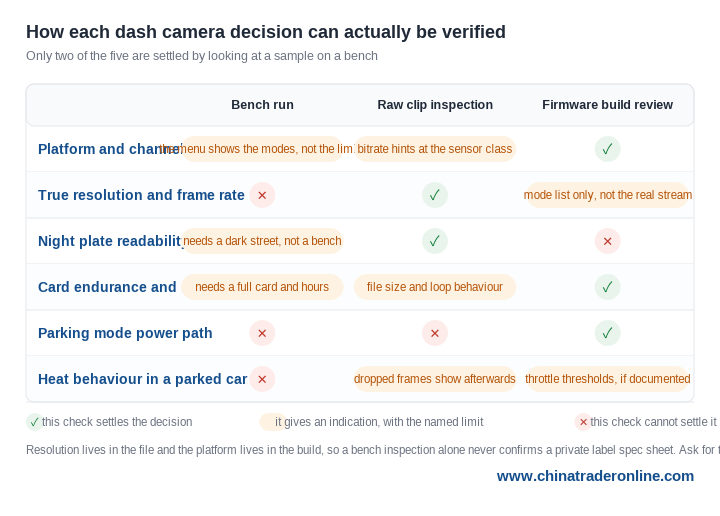
What to put on the order, and how to check it in a week
Write the sensor part number, the maximum frame rate at each resolution, the minimum bitrate at 1080p30, the card endurance class and maximum tested capacity, the power path for parking mode, the firmware version to be shipped, and the language list. Then name the three artefacts: a raw clip from the production build, the firmware version string, and the packing list showing the card and hardwire kit as separate line items rather than bundled assumptions.
Run the sample for thirty days in a car before the second order, not the first — heat failures and card failures show up in weeks, not hours. Browse the car gadgets category to see which housings and mounts the current range uses, then ask for the build string before you commit to a logo on the box.
Sourcing products from China?
Send your product list and target quantity for a quote and a digital proof.
Get a free quoteRelated products
 2DIN In Dash Car DVD With 6.2 Inch Digital Display + Bluetooth + GPS + FM Radio+ Analog TV (BMW Edition)CTO56793
 HD 720p Vehicle Car Camera DVR Dashboard Recorder (Night Vision)CTO56794
 4.3 Inch Bluetooth Rearview Mirror with Built-in GPS NavigationCTO56804
 Steering wheel Bluetooth Hands Free car kitCTO56819
NEW FULL HD 1080P Vehicle Car DVR TFT Camera CAM HDMI Mobile-i Black box DVCTO66321